 md2pdf
ChatGPT · Claude · Gemini → PDF
Export AI answers as PDFs that actually look like documents
Copy the reply, paste it into md2pdf, and get real A4 pages: highlighted code, tables that stay aligned, an automatic table of contents with accurate page numbers. Free to try, no account.
Typesetting runs in your browser. The text you paste is never uploaded to a server.
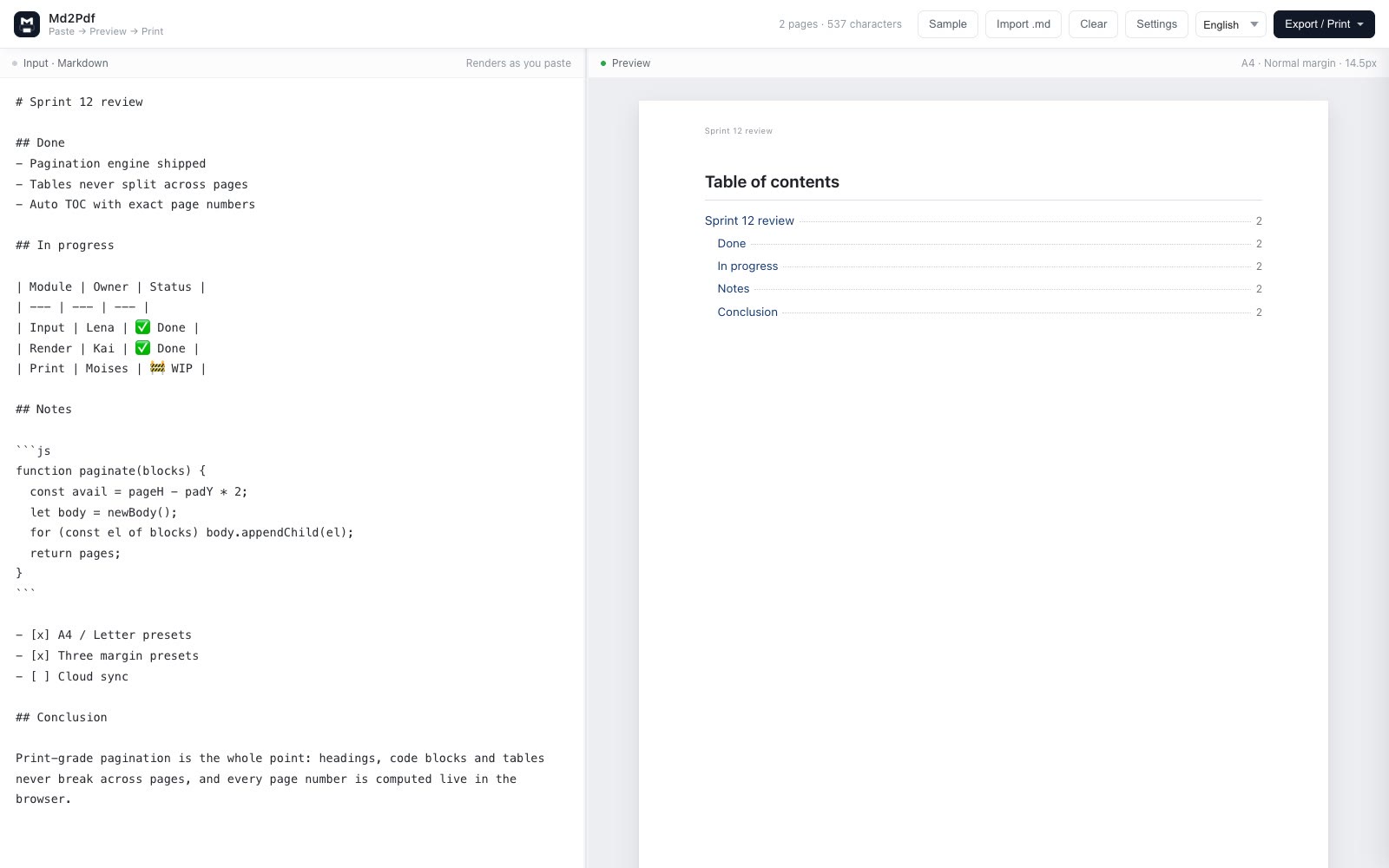
Three steps, ten seconds
No file conversion, no Word re-formatting, no plugins.
- Copy the answer Use the assistant’s copy button. Markdown formatting comes along automatically.
- Paste it into md2pdf The preview updates as you type: headings, lists, tables and code blocks already paginated.
- Export PDF One click downloads a PDF. Or use the print dialog for a vector PDF with selectable text.
What the chat window cannot do
Real page frames
A4 or Letter in portrait, three margin presets. What you see is literally the sheet that comes out.
No split blocks
Headings, code blocks and tables are measured as units and pushed whole to the next page — never cut in half.
Table of contents
Long answers get an automatic TOC with correct page numbers, since pages are counted before printing.
Headers and page numbers
Every page carries the document title and “3 / 12”, which is what a circulated document needs.
Code that reads
Syntax highlighting and optional line numbers, with an ink-saving theme for black-and-white printing.
Nothing leaves the browser
No upload step, no account. Sensitive prompts and internal code stay on your machine.
Chinese and English, same document
Mixed-language answers usually break: the Latin font decides line height and the Chinese glyphs end up cramped. Switch the template and the type system, indent and line height change with it:
General
Default layout for English and mixed content. No first-line indent.
Official document
Follows GB/T 9704: centered title, 16pt body, every paragraph indented two characters.
Academic paper
Abstract and keywords block, centered section headings, hanging references in GB/T 7714 style.
Resume
Centered name with contact line, underlined sections, tight bullets. See the resume page.
Paste your next answer into md2pdf
Free to write and preview — you see the finished pages before paying anything. Exporting the PDF is a one-time $19.90 Pro unlock. Nothing to install, no account needed to try.
FAQ
How do I export a ChatGPT answer to PDF?
Copy the answer, paste it into md2pdf, then either export a PDF file directly or use the system print dialog to save a vector PDF with selectable text. Writing and previewing are free with no upload; exporting is part of the Pro entitlement.
Why not just print the chat window?
A printed chat keeps the chat chrome, has no page frame, and breaks code blocks and tables across pages. md2pdf measures every block against the A4 frame, so blocks are never split.
Does syntax highlighting survive?
Yes. Fenced code blocks keep highlighting and optional line numbers, and you can pick between an ink-saving black-and-white look and dark code blocks.
Does it work for Claude, Gemini and DeepSeek?
Yes. Any assistant that answers in Markdown behaves identically: copy, paste, export.
Is it really free?
Typesetting and live preview are free, so you can check the pages before paying. Exporting is a one-time $19.90 Pro unlock covering every export path and removing the footer mark.